PNG to SVG Converter for Cut Files
There are dozens of "PNG to SVG converters" online. Almost none of them produce a file a vinyl cutter can actually use. A cut file is not the same thing as a vector fill - the machine needs one continuous line, not a hundred coloured shapes. This is a purpose-built PNG to SVG converter for print-then-cut workflows.
Why generic converters fail on cut files
Free online converters like the ones offered by Convertio and Adobe Express run one of two algorithms: bitmap trace (Inkscape's Trace Bitmap, Illustrator's Image Trace) or colour region vectorisation. Both do the same thing at the end - split the raster into vector shapes, one per colour region.
That works for logos-as-illustrations but breaks for cut files:
- Every internal colour boundary becomes a cut line, so the machine tries to cut through the artwork.
- The output is filled shapes, not a stroke - you can't cut a fill.
- There's no offset, so the "cut line" runs exactly on the edge of the ink and any print-to-cut wobble shows a coloured edge.
- No spot colour, so RIP software can't tell "print" from "cut".
What a cut file needs instead
The kind of SVG a Silhouette, Cricut, Roland, Graphtec or Brother machine can actually cut:
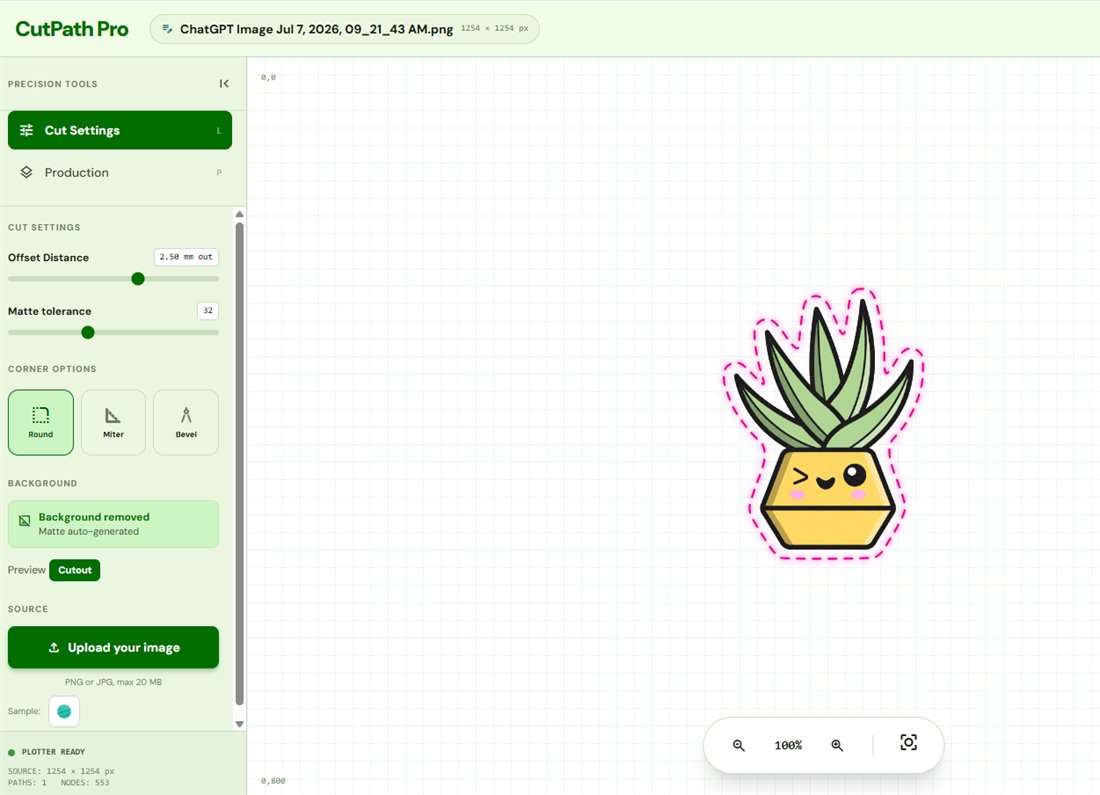
- A single continuous vector path around the outside of the artwork.
- A stroke, not a fill, so the blade follows the line.
- A spot colour (usually magenta or a specific "CutContour" swatch) on its own layer, so the RIP recognises it as the cut layer.
- An offset from the artwork edge (typically 2 to 3 mm) so print-to-cut alignment is forgiving.
- Optional registration marks the machine's sensor can find on a printed sheet.
That's what CutPath Pro exports.
How the conversion works
- Upload a PNG (or JPG - background removed on the fly).
- Preview loads instantly; adjust offset (0–5 mm) and corner style if needed.
- Optionally pick a machine to add registration marks for your cutter's sensor.
- Export as SVG. Also available in DXF, EPS, print-then-cut PDF and cut-only PDF with CutContour spot.
One credit unlocks the design and every re-download in every format is free. First conversion is free - no card, no watermarks.
What the exported SVG looks like
Open the SVG in Silhouette Studio or Illustrator and you'll see two things: your printable artwork raster on one layer, and the cut path as a stroke on a second layer called CutContour. Delete the raster if you only need the cut file; keep both if you're sending a print-and-cut job to a plotter.
Frequently asked
Why not use a free online PNG to SVG converter?
Generic converters vectorise every colour region, so a photo becomes hundreds of coloured shapes and the machine tries to cut every one of them. You need a converter that produces one continuous cut path, not a vector fill.
What SVG structure does CutPath Pro produce?
One vector cut path as a stroke, on its own layer, in the spot colour your machine expects. Silhouette: magenta stroke on layer "CutContour". Roland: CutContour spot layer VersaWorks recognises.
Is the SVG free to re-download?
Yes. One credit unlocks the design; every re-download in every format is then free from your My Files page.
Convert your first PNG free
Upload a PNG, get a machine-ready SVG cut file in seconds. No card, no watermarks.